Buffer Overflow
Reminder on strings
In C, a string is an array of char.
More precisely, it is a pointer to the first element of an array of char.
char *string = "hello";
| index | 0 | 1 | 2 | 3 | 4 | 5 |
|---|---|---|---|---|---|---|
| char | h | e | l | l | o | \0 |
The compiler will add a null byte \0 to terminate the string automatically (because this is a string litteral).
A char can hold one byte of data, and is used to represent letters. Everything in memory is represented using hexadecimal values (0x1 -> 0xF), so to represent a letter, one can use the ascii table.
| Hex | Char |
|---|---|
| 0 | NUL |
| 61 | a |
| 62 | b |
| 63 | c |
Check man ascii to get the whole table.
So strings would look like this in memory (depending on endianness, we'll see that later, this is big-endian representation):
| index | 0 | 1 | 2 | 3 |
|---|---|---|---|---|
| char | a | a | a | a |
| hex | 0x61 | 0x61 | 0x61 | 0x61 |
| index | 0 | 1 | 2 | 3 | 4 | 5 |
|---|---|---|---|---|---|---|
| char | h | e | l | l | o | \0 |
| hex | 0x68 | 0x65 | 0x6c | 0x6c | 0x6f | 0x0 |
Definition
A buffer overflow happens when an application tries to write too much data into a buffer, leading to an overflow.
#include <stdio.h>

void main()
{
    printf("What is your name ?\n");
    char buffer[20] = {0};
    gets(buffer);
    printf("Hello %s\n", buffer);
}
This simple program :
- prints a message asking
"What is your name ?" - allocates a buffer on the stack, with 20 bytes of data
- asks user for input from
STDIN(unlimited amount of data) - copies the input into the buffer
- prints a message
"Hello <user input>"
Let's try that in a terminal.
# compile the code
gcc main.c -o main -m32

# execute it
./main
What is your name ?
Michel
Hello Michel
That worked well, the string Michel is only 6 bytes, with the terminating newline \n (Enter key press) it totals to 7 bytes,
which is way under the allowed 20 bytes.
Now what if we typed something with more than 20 bytes ?
# generate a string of 40 bytes using python
python3 -c "print('A' * 40)"
aaaaaaaaaaaaaaaaaaaaaaaaaaaaaaaaaaaaaaaa

./main
What is your name ?
aaaaaaaaaaaaaaaaaaaaaaaaaaaaaaaaaaaaaaaa # copy paste the generated string from earlier
Hello aaaaaaaaaaaaaaaaaaaaaaaaaaaaaaaaaaaaaaaa
zsh: segmentation fault  ./main
We typed 40 bytes of data + 1 byte of newline character (\n when you press your Enter key) = 41 bytes.
What is a segfault ? Why did the program crash ? So many questions, that will be answered right below.
GDB Example
Open the app in gdb
gdb mainDisassemble the
main()functionpwndbg> disassemble main
Dump of assembler code for function main:
0x565561ad <+0>: lea ecx,[esp+0x4]
0x565561b1 <+4>: and esp,0xfffffff0
0x565561b4 <+7>: push DWORD PTR [ecx-0x4]
0x565561b7 <+10>: push ebp
0x565561b8 <+11>: mov ebp,esp
0x565561ba <+13>: push ebx
0x565561bb <+14>: push ecx
0x565561bc <+15>: sub esp,0x20
0x565561bf <+18>: call 0x565560b0 <__x86.get_pc_thunk.bx>
0x565561c4 <+23>: add ebx,0x2e30
0x565561ca <+29>: sub esp,0xc
0x565561cd <+32>: lea eax,[ebx-0x1fec]
0x565561d3 <+38>: push eax
0x565561d4 <+39>: call 0x56556060 <puts@plt>
0x565561d9 <+44>: add esp,0x10
0x565561dc <+47>: mov DWORD PTR [ebp-0x1c],0x0
0x565561e3 <+54>: mov DWORD PTR [ebp-0x18],0x0
0x565561ea <+61>: mov DWORD PTR [ebp-0x14],0x0
0x565561f1 <+68>: mov DWORD PTR [ebp-0x10],0x0
0x565561f8 <+75>: mov DWORD PTR [ebp-0xc],0x0
0x565561ff <+82>: sub esp,0xc
0x56556202 <+85>: lea eax,[ebp-0x1c]
0x56556205 <+88>: push eax
0x56556206 <+89>: call 0x56556050 <gets@plt>
0x5655620b <+94>: add esp,0x10
0x5655620e <+97>: sub esp,0x8
0x56556211 <+100>: lea eax,[ebp-0x1c]
0x56556214 <+103>: push eax
0x56556215 <+104>: lea eax,[ebx-0x1fd8]
0x5655621b <+110>: push eax
0x5655621c <+111>: call 0x56556040 <printf@plt>
0x56556221 <+116>: add esp,0x10
0x56556224 <+119>: nop
0x56556225 <+120>: lea esp,[ebp-0x8]
0x56556228 <+123>: pop ecx
0x56556229 <+124>: pop ebx
0x5655622a <+125>: pop ebp
0x5655622b <+126>: lea esp,[ecx-0x4]
0x5655622e <+129>: ret
End of assembler dump.Put some breakpoints:
pwndbg> b *main + 89   # put a breakpoint on gets()
pwndbg> b *main + 94   # put a breakpoint after gets()
pwndbg> r              # run
It will show this :
0x56556205 <main+88>     push   eax
► 0x56556206 <main+89>     call   gets@plt                    <gets@plt>
        arg[0]: 0xffffd25c ◂— 0x0
        arg[1]: 0x0
        arg[2]: 0xf7c1ca2f ◂— '_dl_audit_preinit'
        arg[3]: 0x565561c4 (main+23) ◂— add ebx, 0x2e30

0x5655620b <main+94>     add    esp, 0x10
If you remember correctly from the calling convention page,
the arguments of the function gets() are retrieved from the stack.
So our string, or buffer, is represented by the first element (top of the stack),
which is 0xffffd25c in this example (could be different on your machine).
You can confirm that by checking the stack in pwndbg:
pwndbg> stack 20
00:0000│ esp 0xffffd240 —▸ 0xffffd25c ◂— 0x0        ; top of the stack
01:0004│     0xffffd244 ◂— 0x0
02:0008│     0xffffd248 —▸ 0xf7c1ca2f ◂— '_dl_audit_preinit'
03:000c│     0xffffd24c —▸ 0x565561c4 (main+23) ◂— add ebx, 0x2e30
04:0010│     0xffffd250 —▸ 0xf7fc14a0 —▸ 0xf7c00000 ◂— 0x464c457f
05:0014│     0xffffd254 —▸ 0xf7fd98cb (_dl_fixup+235) ◂— mov edi, eax
06:0018│     0xffffd258 —▸ 0xf7c1ca2f ◂— '_dl_audit_preinit'
07:001c│ eax 0xffffd25c ◂— 0x0
... ↓        4 skipped
0c:0030│     0xffffd270 —▸ 0xffffd290 ◂— 0x1
0d:0034│     0xffffd274 —▸ 0xf7e1cff4 (_GLOBAL_OFFSET_TABLE_) ◂— 0x21cd8c
0e:0038│ ebp 0xffffd278 ◂— 0x0                      ; bottom of the stack
0f:003c│     0xffffd27c —▸ 0xf7c23295 (__libc_start_call_main+117) ◂— add esp, 0x10
| hex index | hex offset | register | address | value | dereferenced pointer |
|---|---|---|---|---|---|
| 00 | 0000 | esp | 0xffffd240 | 0xffffd25c | 0x0 |
Observe the address below ebp. What is it ?
Hint
Answer
main() ends. The return address 0xf7c23295 is saved in memory at 0xf7c23295Now we step after the instruction, which will ask us for input.
Just copy-paste
aaaaaaaaaaaaaaaaaaaaaaaaaaaaaaaaaaaaaaaa.pwndbg> ni
aaaaaaaaaaaaaaaaaaaaaaaaaaaaaaaaaaaaaaaaNow check the stack again
pwndbg> stack 20
00:0000│ esp 0xffffd240 —▸ 0xffffd25c ◂— 'aaaaaaaaaaaaaaaaaaaaaaaaaaaaaaaaaaaaaaaa'
01:0004│     0xffffd244 ◂— 0x0
02:0008│     0xffffd248 —▸ 0xf7c1ca2f ◂— '_dl_audit_preinit'
03:000c│     0xffffd24c —▸ 0x565561c4 (main+23) ◂— add ebx, 0x2e30
04:0010│     0xffffd250 —▸ 0xf7fc14a0 —▸ 0xf7c00000 ◂— 0x464c457f
05:0014│     0xffffd254 —▸ 0xf7fd98cb (_dl_fixup+235) ◂— mov edi, eax
06:0018│     0xffffd258 —▸ 0xf7c1ca2f ◂— '_dl_audit_preinit'
07:001c│ eax 0xffffd25c ◂— 'aaaaaaaaaaaaaaaaaaaaaaaaaaaaaaaaaaaaaaaa'
... ↓        9 skipped
11:0044│     0xffffd284 ◂— 0x0
12:0048│     0xffffd288 —▸ 0xf7ffcff4 (_GLOBAL_OFFSET_TABLE_) ◂— 0x33f14
13:004c│     0xffffd28c —▸ 0xf7c23295 (__libc_start_call_main+117) ◂— add esp, 0x10
The first element of the stack, which is our buffer[20], has been filled with our input AAAA....
But where is ebp ?
It should be at the 0fth element (16th in decimal) on the stack, at address 0xffffd27c.
But it seems like it is in the 9 skipped values.
- Let's check what is at the address now.
pwndbg> x 0xffffd27c
0xffffd27c:     0x61616161
If you understood the reminder on strings, you should know that
this is aaaa.
What does it mean ? The return address has been replaced with AAAA, and so if we continue the program...
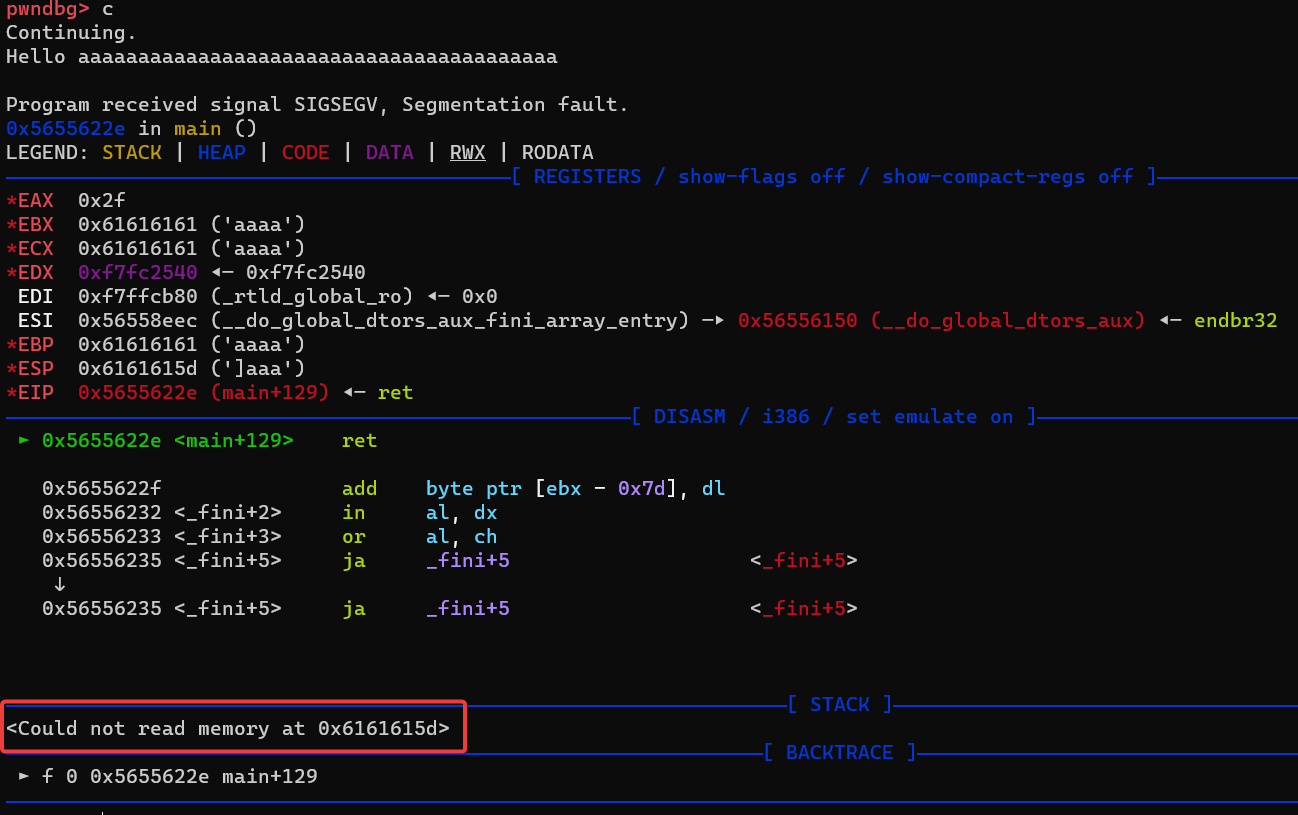
We see the infamous segfault error.
What does it mean ?
Check the error below : "Could not read memory at 0x6161615d".
A segmentation fault is triggered when an application tries to access a restricted memory location.
In this case, the application tried to access the memory at 0x6161615d, which does not exist.
The memory address looks familiar... it is AAAA string we inputed earlier !
How did this happen ?
So at the end of main(), the program tries to return to the saved return address, which was overwritten with 0x41414141 ("AAAA").
Finally it crashes because the address 0x41414141 does not exist in the address space of the program.
How does it happen ?
As we saw earlier, the crash could have been easily avoided by using a secure version of the function gets().
But how does it still happen in the real world ?
A few reasons :
- Using unsafe functions that do not check bounds (such as
gets()) - Off-by-one errors (copying 1 more byte, wrong
forloop end limit) - Buffer size is too small
- Unseen
ifbranch execution - and more...
Consequences
With our example, we crashed the program.
But as we've seen, the return address was overwritten, so what would happen if we change the address to
something else (and not just a bunch of AAAA) ?
The answer :
- executing other functions in the binary
- executing our own instructions (shellcode)
Which will be demonstrated in the next sections !